

Installing Java for Programming

This article explains how to install the Java programming tools, if you just want to Java in order to run Java programs and applets, check out Java for Users - Installing Java
It seems obligatory in most of the beginning Java programming books and websites I see to explain how to install Java. Now, maybe this is the system administrator in me, but I think that if you need to be walked through how to install a program that uses your operating system's standard installation method and is intended for user (rather than server administrator) installation, you probably need to take a step back and learn to use your operating system (OS) before you start learning to program. Your programming tools and programs will live on your OS and this is unlikely to be last interaction you'll have with your OS during your programming career. For instance, at some point you will probably need to install third-party code libraries.
However, finding the software to install is another matter. Like the Java every website is different. The necessary Java software for programmers, the JDK (Java Development Kit) is available for download at java.sun.com. Although change is a constant on the web, Sun seems to reliably have a button marked download on the front page of this site:
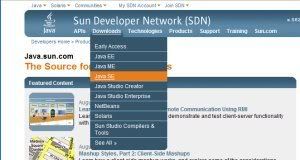
There are several versions of the JDK available, as a beginning Java programmer, you probably want the Java SE JDK. You would know if you needed something else – like if you were taking a course or following a tutorial that told you to install something else. Once you select Java SE you will see something like the following screen, with the latest version of the Java SE SDK at the top.
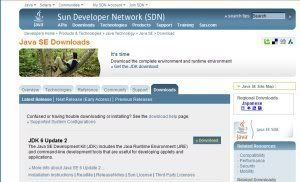
Click on the "Download" link and you will be forwarded to the actual download page.
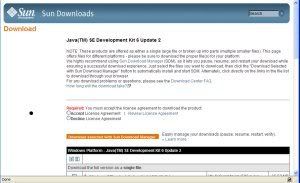
On this screen, you have to accept the license before you can do anything else. Once you accept the license, the section on the page about license acceptance disappears. Then you can choose which package you want to download based on which OS you are running and, in some cases, which installation mechanism you want to use.
You may notice a suggestion to use Sun Download Manager and an option to install it. You don't need to do this to install a Java SDK. However, I have found Sun Download Manager to be the most reliable way to download software, so if you are having trouble downloading this or any file, I would recommend that you give it a try.
Once you get to this point, you should be able to download and install the JDK like you would any other software on your system.
It seems obligatory in most of the beginning Java programming books and websites I see to explain how to install Java. Now, maybe this is the system administrator in me, but I think that if you need to be walked through how to install a program that uses your operating system's standard installation method and is intended for user (rather than server administrator) installation, you probably need to take a step back and learn to use your operating system (OS) before you start learning to program. Your programming tools and programs will live on your OS and this is unlikely to be last interaction you'll have with your OS during your programming career. For instance, at some point you will probably need to install third-party code libraries.
However, finding the software to install is another matter. Like the Java every website is different. The necessary Java software for programmers, the JDK (Java Development Kit) is available for download at java.sun.com. Although change is a constant on the web, Sun seems to reliably have a button marked download on the front page of this site:
There are several versions of the JDK available, as a beginning Java programmer, you probably want the Java SE JDK. You would know if you needed something else – like if you were taking a course or following a tutorial that told you to install something else. Once you select Java SE you will see something like the following screen, with the latest version of the Java SE SDK at the top.
Click on the "Download" link and you will be forwarded to the actual download page.
On this screen, you have to accept the license before you can do anything else. Once you accept the license, the section on the page about license acceptance disappears. Then you can choose which package you want to download based on which OS you are running and, in some cases, which installation mechanism you want to use.
You may notice a suggestion to use Sun Download Manager and an option to install it. You don't need to do this to install a Java SDK. However, I have found Sun Download Manager to be the most reliable way to download software, so if you are having trouble downloading this or any file, I would recommend that you give it a try.
Once you get to this point, you should be able to download and install the JDK like you would any other software on your system.
Reference
java.sun.com - Sun's Java website for programmers and downloading Java SDK'sThis site needs an editor - click to learn more!
You Should Also Read:
Java For Programmers
Programming Tools
Java for Users - Installing Java
Related Articles
Editor's Picks Articles
Top Ten Articles
Previous Features
Site Map
Content copyright © 2023 by Julie L Baumler. All rights reserved.
This content was written by Julie L Baumler. If you wish to use this content in any manner, you need written permission. Contact
BellaOnline Administration
for details.
