More New Tools in Poser 7

Lights, Cameras, Animation, Walk and Talk Designer
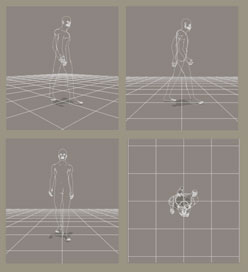
Colors, shadows and special effects depend on realistic lighting. In Poser® 7, you can add and replace lights with a click of your mouse. With the Point At control, you can animate your lighting by "programming" the lights to follow, or target, any object in your scene. Cameras are as important as lighting and with the new Create Camera menu, you can easily create your own cameras. You will also like the new built-in cameras for close-ups of faces and hands and the 4-pane camera that lets you view your scene from four angles simultaneously. You can even animate with the cameras by changing focal length, scale, position, depth of field and motion blur.
In the new Animation Palette, you can use keyframes and layers to animate almost anything. You will especially appreciate the new Visibility animation that allows you to animate the visibility of any object. The Talk Designer's Emotional Tweaks and the life-like head and eye movements for synchronizing face and sound makes lip synch animation easy. The Walk Designer's preset animations make creating realistic human-walk animation a simple two-step process.
e frontier screen shots used by permission of e frontier America, Inc. and e frontier, Inc. Poser, Shade, Manga Studio, MotionArtist are trademarks or registered trademarks of e frontier America, Inc. and e frontier, Inc.
Colors, shadows and special effects depend on realistic lighting. In Poser® 7, you can add and replace lights with a click of your mouse. With the Point At control, you can animate your lighting by "programming" the lights to follow, or target, any object in your scene. Cameras are as important as lighting and with the new Create Camera menu, you can easily create your own cameras. You will also like the new built-in cameras for close-ups of faces and hands and the 4-pane camera that lets you view your scene from four angles simultaneously. You can even animate with the cameras by changing focal length, scale, position, depth of field and motion blur.
In the new Animation Palette, you can use keyframes and layers to animate almost anything. You will especially appreciate the new Visibility animation that allows you to animate the visibility of any object. The Talk Designer's Emotional Tweaks and the life-like head and eye movements for synchronizing face and sound makes lip synch animation easy. The Walk Designer's preset animations make creating realistic human-walk animation a simple two-step process.
e frontier screen shots used by permission of e frontier America, Inc. and e frontier, Inc. Poser, Shade, Manga Studio, MotionArtist are trademarks or registered trademarks of e frontier America, Inc. and e frontier, Inc.

Related Articles
Editor's Picks Articles
Top Ten Articles
Previous Features
Site Map
Content copyright © 2023 by Diane Cipollo. All rights reserved.
This content was written by Diane Cipollo. If you wish to use this content in any manner, you need written permission. Contact Diane Cipollo for details.