

Victims of Disaster and Spammers

It began with the rain. Cold, driving rain blown sideways by gusting winds drummed against our house, where my family and I sat huddled before our television. News reports were grim. Seasoned weather reporters were anxious and tense, warning all viewers to prepare for the worst. Suddenly, the lashing rain was replaced with hail. Then the warning wail of the tornado siren began and the cacophony outside became a deafening natural concert.
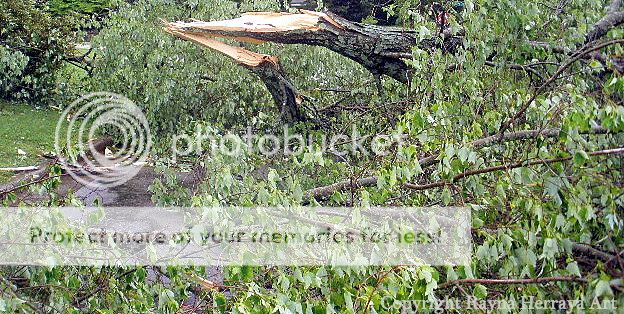
My family escaped unscathed – physically. We had some downed trees, loosened shingles, and a yard full of branches and other debris, so we were grateful. Our families and friends were also, for the most part. There are some homes in worse shape than others, some damaged vehicles, broken belongings... but we were all so thankful to be alive.
Alongside our gratitude were our concerns, however. Now we (and approximately one million other residents) were without power. Many were also without running water or shelter. Banks were closed, employers and schools weren’t sure when normal work days would resume, and a ration was put on gasoline – 3 gallons per vehicle. Quickly, the mayor declared a “dusk-till-dawn” curfew was in effect. The unusual circumstances began to take their toll quickly, and soon our community was desperate. Of course, with desperation comes those who will take advantage.
For victims of the devastating tornadoes, which killed over 300 people, the scams came knocking at our doors – literally. Offers to chop up fallen trees, repair damaged roofs, and help clear debris were often phony. After accepting the victims’ money up-front, the scammer would leave - supposedly to get tools or an assistant. Instead, they never returned. Because most people paid in cash, finding the swindlers was often impossible. The victim is victimized twice.
How can a victim of a natural disaster be scammed online when they probably don’t even have Internet access? Well, they probably can’t be, but you can. Much like the aftermath of Hurricane Katrina, another devastating natural disaster that took hundreds of lives in the United States, websites claiming to be a source of aid to victims can be found by the dozens. These sites, often requesting modest donations, are usually not linked to any real relief effort. Any funds dedicated to them go directly into the scammers pockets. Email solicitations are sent in abundance too. Be leery of any email with the phrases ”Disaster Relief” or ”Help Tornado Victims!” or something similarly titled. Very rarely do victims of a natural disaster actually receive any help via email solicitation.
So how can you actually help those who were devastated by a natural disaster? Rely on reputable companies who have a proven track record of actually providing aid to those who need it.
Trustworthy sources like The Corporation for National and Community Service will accept help in the form of donations and/or your time and energy. They will also direct you to other reputable companies who can help the victims in other ways.
We were fortunate. After just a few days with no electricity, hot water, and iffy phone lines, my family left the city and stayed with relatives in another state. Not only were they generous hosts, they were a loving, wonderful, fun distraction from a quite stressful week.
Even if your heart is in the place, make sure that your effort to help doesn’t go to someone who does not deserve it. Visit the links below for more resources.
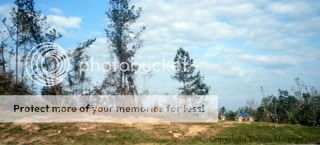
Governor's Emergency Relief Fund for the Recent Alabama Tornado Outbreak
Mississippi Disaster Recovery Fund
FEMA - Federal Emergency Management Agency
My family escaped unscathed – physically. We had some downed trees, loosened shingles, and a yard full of branches and other debris, so we were grateful. Our families and friends were also, for the most part. There are some homes in worse shape than others, some damaged vehicles, broken belongings... but we were all so thankful to be alive.
Alongside our gratitude were our concerns, however. Now we (and approximately one million other residents) were without power. Many were also without running water or shelter. Banks were closed, employers and schools weren’t sure when normal work days would resume, and a ration was put on gasoline – 3 gallons per vehicle. Quickly, the mayor declared a “dusk-till-dawn” curfew was in effect. The unusual circumstances began to take their toll quickly, and soon our community was desperate. Of course, with desperation comes those who will take advantage.
For victims of the devastating tornadoes, which killed over 300 people, the scams came knocking at our doors – literally. Offers to chop up fallen trees, repair damaged roofs, and help clear debris were often phony. After accepting the victims’ money up-front, the scammer would leave - supposedly to get tools or an assistant. Instead, they never returned. Because most people paid in cash, finding the swindlers was often impossible. The victim is victimized twice.
How can a victim of a natural disaster be scammed online when they probably don’t even have Internet access? Well, they probably can’t be, but you can. Much like the aftermath of Hurricane Katrina, another devastating natural disaster that took hundreds of lives in the United States, websites claiming to be a source of aid to victims can be found by the dozens. These sites, often requesting modest donations, are usually not linked to any real relief effort. Any funds dedicated to them go directly into the scammers pockets. Email solicitations are sent in abundance too. Be leery of any email with the phrases ”Disaster Relief” or ”Help Tornado Victims!” or something similarly titled. Very rarely do victims of a natural disaster actually receive any help via email solicitation.
So how can you actually help those who were devastated by a natural disaster? Rely on reputable companies who have a proven track record of actually providing aid to those who need it.
Trustworthy sources like The Corporation for National and Community Service will accept help in the form of donations and/or your time and energy. They will also direct you to other reputable companies who can help the victims in other ways.
We were fortunate. After just a few days with no electricity, hot water, and iffy phone lines, my family left the city and stayed with relatives in another state. Not only were they generous hosts, they were a loving, wonderful, fun distraction from a quite stressful week.
Even if your heart is in the place, make sure that your effort to help doesn’t go to someone who does not deserve it. Visit the links below for more resources.
Governor's Emergency Relief Fund for the Recent Alabama Tornado Outbreak
Mississippi Disaster Recovery Fund
FEMA - Federal Emergency Management Agency
This site needs an editor - click to learn more!

Related Articles
Editor's Picks Articles
Top Ten Articles
Previous Features
Site Map
Content copyright © 2023 by Rayna H. Battle. All rights reserved.
This content was written by Rayna H. Battle. If you wish to use this content in any manner, you need written permission. Contact
BellaOnline Administration
for details.
