Affinity Designer Thank You Card
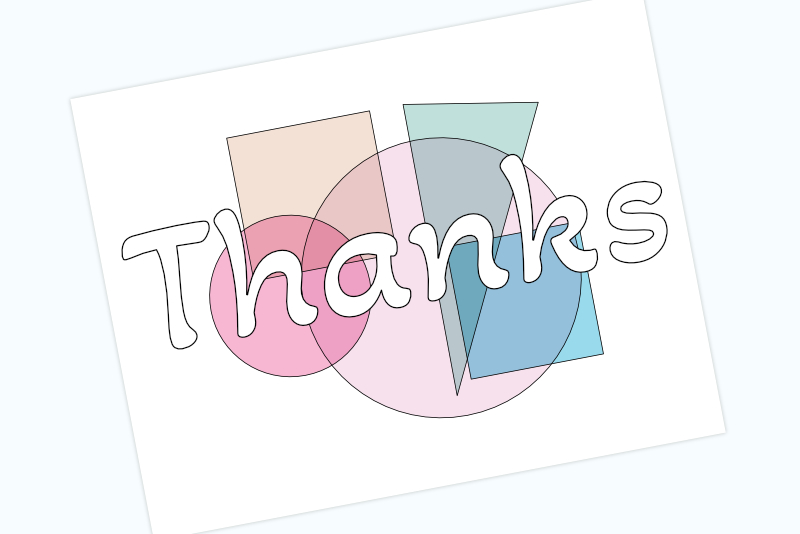
Let's continue with the thank you card design that we are creating in Affinity Designer. We are ready to size and position the shapes on the canvas.
The following sizes and positioning of the shapes is the layout that I created in the sample design. Feel free to use your own sizes and positioning.
Screenshots used by permission of Serif (Europe) Ltd. This article is not endorsed by Serif Ltd.
The following sizes and positioning of the shapes is the layout that I created in the sample design. Feel free to use your own sizes and positioning.
- In the Transform panel, set the width, height, x and y locations for the shapes, using the measurements below.
Tan Square (see screenshot)
Width: 1.35 in
Height: 1.35 in
X: 1.392 in
Y: 0.652 in
Blue Square (see screenshot)
Width: 1.25 in
Height: 1.25 in
X: 3.202 in
Y: 2.025 in
Green Triangle (see screenshot)
Width: 1.25 in
Height: 2.75 in
X: 3.045 in
Y: 0.652 in
Large Circle (see screenshot)
Width: 2.6 in
Height: 2.6 in
X: 1.805 in
Y: 0.998 in
Small Circle (see screenshot)
Width: 1.5 in
Height: 1.5 in
X: 0.948 in
Y: 1.452 in - In the Layers panel, select all the shape layers. Right click and choose Group from the menu.
- Now we can center the design on the canvas. With the Group layer still selected, click Layer - Alignment - Align Center, to center horizontally. Next, click Layer - Alignment - Align Middle, to center vertically (see screenshot).
- Select the Artistic Text tool and click on the canvas. Type in your message text. With the text still selected, set the Font, Style and Size for the text in the Context toolbar (see screenshot).
Font: Akaya Kanadaka
Style: Regular
Size: 125 pt - With the text still selected, center the text horizontally and vertically.
- Save your project file.
Finally, we will add and style the text. I've used the Google free font named Akaya Kanadaka but choose your own font.
Screenshots used by permission of Serif (Europe) Ltd. This article is not endorsed by Serif Ltd.

Related Articles
Editor's Picks Articles
Top Ten Articles
Previous Features
Site Map
Content copyright © 2023 by Diane Cipollo. All rights reserved.
This content was written by Diane Cipollo. If you wish to use this content in any manner, you need written permission. Contact Diane Cipollo for details.