Wii Remote Controller
The Wii Remote Controller is shaped like a standard TV remove, and has motion sensing ability. You wave it around, and your on-screen character waves their wand!
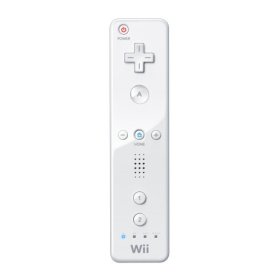 This isn't an add-on controller - this is the actual, standard controller that most if not all games on the Nintendo Wii use as their primary control unit. There is also a "nunchuck" that can be used in your off hand, but many games don't use the nunchuck.
The aim of the Wii was to make gaming as simple and intuitive as possible for the casual non gamer. Pretty much every person with a TV is comfortable using a TV remote. You point, you click. The Wii Remote Controller works in the same fashion. The motion sensors know what you are doing with the remote. If you're playing a baseball game, you swing at the ball. If you're playing a bowling game, you bring your arm back and swing it forward. Everything "makes sense". A sword swing? A light saber battle? Just move your arm and the character does the same thing.
There are only two buttons that really matter. There's an A button on the front that you push for most operations. There's also a trigger underneath that is the B button. Depending on the game, they will have you use one or the other button. There are also a few other buttons for more complex gaming. There's a D-pad. A "home" button lets you go instantly back to the main Wii menu if you're tired of playing. There's a plus and minus button, a 1 and 2 button. There's even a power button. You don't have to walk over to your Wii any more to turn it on or off. Just hit the power button on the remote and you're all set.
The remote runs on two AA batteries, so there's no USB plugging in or charging up, as with the other systems' remotes. You do get a wrist strap, though, so the Wii remote doesn't fly out of your hands while you're doing a super powerful golf swing.
There's even a speaker in the remote! This is great if you're playing a game against another player. Say I'm boxing my boyfriend and I am the winner. *My* remote says that I triumphed, to me. Neat!
I definitely love the Wii remote controller. It's light, it's super easy to use, it's intuitive and I can just pop batteries into it when it runs out, instead of having to wait for a recharge. Highly recommended. Just note that if you want to play a game that needs a nunchuck as well, that you have to buy that separately.
Buy the Wii Remote Control from Amazon.com
This isn't an add-on controller - this is the actual, standard controller that most if not all games on the Nintendo Wii use as their primary control unit. There is also a "nunchuck" that can be used in your off hand, but many games don't use the nunchuck. The aim of the Wii was to make gaming as simple and intuitive as possible for the casual non gamer. Pretty much every person with a TV is comfortable using a TV remote. You point, you click. The Wii Remote Controller works in the same fashion. The motion sensors know what you are doing with the remote. If you're playing a baseball game, you swing at the ball. If you're playing a bowling game, you bring your arm back and swing it forward. Everything "makes sense". A sword swing? A light saber battle? Just move your arm and the character does the same thing.
There are only two buttons that really matter. There's an A button on the front that you push for most operations. There's also a trigger underneath that is the B button. Depending on the game, they will have you use one or the other button. There are also a few other buttons for more complex gaming. There's a D-pad. A "home" button lets you go instantly back to the main Wii menu if you're tired of playing. There's a plus and minus button, a 1 and 2 button. There's even a power button. You don't have to walk over to your Wii any more to turn it on or off. Just hit the power button on the remote and you're all set.
The remote runs on two AA batteries, so there's no USB plugging in or charging up, as with the other systems' remotes. You do get a wrist strap, though, so the Wii remote doesn't fly out of your hands while you're doing a super powerful golf swing.
There's even a speaker in the remote! This is great if you're playing a game against another player. Say I'm boxing my boyfriend and I am the winner. *My* remote says that I triumphed, to me. Neat!
I definitely love the Wii remote controller. It's light, it's super easy to use, it's intuitive and I can just pop batteries into it when it runs out, instead of having to wait for a recharge. Highly recommended. Just note that if you want to play a game that needs a nunchuck as well, that you have to buy that separately.
Buy the Wii Remote Control from Amazon.com

Related Articles
Editor's Picks Articles
Top Ten Articles
Previous Features
Site Map
Content copyright © 2023 by Lisa Shea. All rights reserved.
This content was written by Lisa Shea. If you wish to use this content in any manner, you need written permission. Contact Lisa Shea for details.