Diagram for PS2 to Cable Hookup

Are you preparing to hook your PS2 up to your cable modem? Here's a diagram to help you figure out where everything plugs in.
First off, you need several things. FIRST you need a cable modem which you probably got from your cable company. SECOND you need a wireless router, which is the thing that splits up your cable modem signal between your PC and your PS2 so both can be online. Learn about the Linksys Wireless Router
THIRD you need the PS2 Network Adaptor. This is the device that allows your PS2 to go online. More about the PS2 Network Adaptor. FOURTH you need the Linksys Wireless Device, which is the unit that lets your PS2 talk to the wireless router. More about the Linksys Wireless Reciever
Here is the diagram:
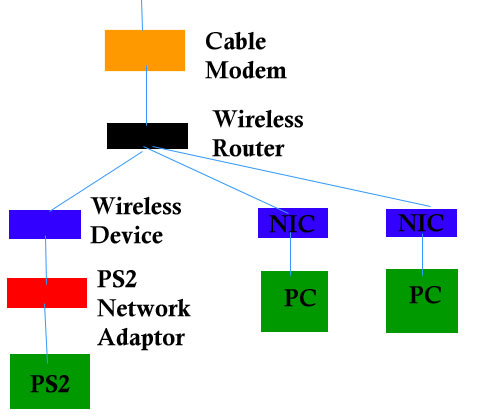
The connection between the wireless router and the Network Interface Cards (NICs) for the PCs can be wired or wireless depending on your preference. Similarly, the connection between the wireless router and the PS2 Network Adaptor can be a cable straight from one to the other if you want, but I REALLY find it to be better to use a wireless device so you don't have to deal with cables.
Your cable connection should be able to EASILY support the PS2 playing games while your computers are doing things as well. We've had all 4 PCs in the house playing online games while the PS2 played something and it went with no problem. If you have cable bottlenecks, check out your cable plan and make sure you are on a plan that supports fast speed! Cable is NOT all the same speed. There are definitely "fast" and "slow" cable plans and if you want the faster plan, you usually have to pay for it!
Getting PS2 Online - Step by Step
Connecting your PS2 to the Internet
What do you Need to put a PS2 Online?
Review of the PS2 Network Adapter
PS2 Wireless Internet Connector - Linksys
PS2 and Wireless Connector Speed
First off, you need several things. FIRST you need a cable modem which you probably got from your cable company. SECOND you need a wireless router, which is the thing that splits up your cable modem signal between your PC and your PS2 so both can be online. Learn about the Linksys Wireless Router
THIRD you need the PS2 Network Adaptor. This is the device that allows your PS2 to go online. More about the PS2 Network Adaptor. FOURTH you need the Linksys Wireless Device, which is the unit that lets your PS2 talk to the wireless router. More about the Linksys Wireless Reciever
Here is the diagram:
The connection between the wireless router and the Network Interface Cards (NICs) for the PCs can be wired or wireless depending on your preference. Similarly, the connection between the wireless router and the PS2 Network Adaptor can be a cable straight from one to the other if you want, but I REALLY find it to be better to use a wireless device so you don't have to deal with cables.
Your cable connection should be able to EASILY support the PS2 playing games while your computers are doing things as well. We've had all 4 PCs in the house playing online games while the PS2 played something and it went with no problem. If you have cable bottlenecks, check out your cable plan and make sure you are on a plan that supports fast speed! Cable is NOT all the same speed. There are definitely "fast" and "slow" cable plans and if you want the faster plan, you usually have to pay for it!
Getting PS2 Online - Step by Step
Connecting your PS2 to the Internet
What do you Need to put a PS2 Online?
Review of the PS2 Network Adapter
PS2 Wireless Internet Connector - Linksys
PS2 and Wireless Connector Speed
You Should Also Read:
Getting PS2 Online - Step by Step

Related Articles
Editor's Picks Articles
Top Ten Articles
Previous Features
Site Map
Follow @lisavideogames
Tweet
Content copyright © 2023 by Lisa Shea. All rights reserved.
This content was written by Lisa Shea. If you wish to use this content in any manner, you need written permission. Contact Lisa Shea for details.