logo
g Text Version
Auto
Beauty & Self
Books & Music
Career
Computers
Education
Family
Food & Wine
Health & Fitness
Hobbies & Crafts
Home & Garden
Money
News & Politics
Relationships
Religion & Spirituality
Society & Culture
Sports
Travel & Leisure
TV & Movies

dailyclick
Bored? Games!
Postcards
Astrology
Take a Quiz
Rate My Photo

new
Ethnic Beauty
Adolescence
Middle Eastern Culture
Yoga
Vision Issues
Paper Crafts
Comedy Movies


dailyclick
All times in EST

Full Schedule
g
g Ergonomics Site
Marji Hajic
BellaOnline's Ergonomics Editor

g

Ergonomic ABCs

26 quick and easy tips from A-Z focusing on ergonomic guidelines for repetitive injury prevention.

A – Awkward Positioning
Awkward positioning, repetitive movements, forceful exertions, exposure to vibration, and exposure to temperature extremes are the leading risk factors for developing repetitive strain injuries.

B – Bifocals
Bifocal use increases the risk of neck strain and headaches as bifocal wearers often crane their necks forward and tilt their heads back to read the screen. If you need to wear corrective lenses, consider having a pair that is prescribed specifically for computer use with the monitor positioned about an arm’s length away.

C – Chair
Office chairs should have a five-star base for stability. The seat height should be adjustable to position feet flat on the floor. If the chair needs to be raised to adjust for desk or work-surface height, a foot rest should be used to support the legs. The chair should provide support for the lower back (the lumbar spine). The seat pan should be deep enough and wide enough to support the body. Adjustments for pan tilt can provide for changes in positioning from a slight recline to neutral to allow for changes throughout the day. A 2 inch clearance between the back of the knees and the edge of the chair allows for good circulation to the legs and reduces pressure points. Arm rests should be adjustable for height so that the shoulders are relaxed. Arm rests should also be short enough to clear the desk so the keyboard can be easily accessible without reaching forward.

D – Desk
The desk should be of appropriate height to support work tasks. Most desks are too high for typing tasks. A sliding keyboard tray positioned underneath the desk may be necessary to lower the keyboard to a good typing height. When typing, the shoulders should be relaxed, the elbows resting at your sides, and the forearms parallel to the floor or slightly slanted down.

E – Elbows
The elbows, shoulders and ears should all line-up when sitting at the keyboard. The head should be held directly above the shoulders, not jutted forward. The shoulders should be relaxed and straight, not rounded forward. The arms should rest at the sides with the elbows directly below the shoulders. The keyboard and mouse should be at appropriate heights and locations so that the arms do not need to reach forward to activate the keys.

F – Forearms
Typically when typing at the keyboard or using a mouse, the forearms are in a palm down, or pronated, position. The neutral position is with the forearm rotated so that the thumbs are up and the palms face towards each other. Some split keyboards allow for each half of the keyboard to be elevated so that an upside down v-shape is formed. This rotates the forearms into a more neutral position. Vertical mice also help to position the forearms in a neutral position.

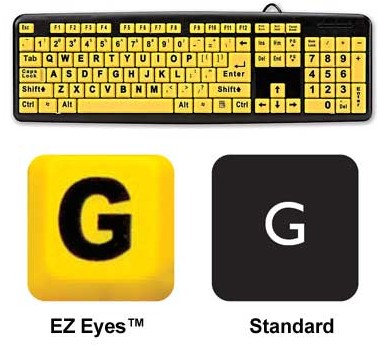
G – Glare
Staring at a monitor for long lengths of time can cause eye strain. Reduce glare by positioning the workstation perpendicular to windows. Use task lights rather than overhead lights. Clean the monitor screen regularly and adjust the color and contrast so that print is easily read.
.
H- Headset
When speaking on the phone for any length of time, or when performing simultaneous keyboard and phone tasks, it is important to use a headset for proper neck positioning. A headset also eliminates nerve tension commonly caused by holding the elbow for any length of time in a bent position (as when holding the phone to the ear).

I – Injury Prevention
Practicing healthy life-style habits can reduce your risk of developing an injury. Stay hydrated, eat a variety of healthy foods, exercise regularly and limit your caffeine, alcohol and nicotine intake. Exercising and applying ergonomic principles to your work area and work activities are also important aspects of injury prevention.

J – Job Rotation
When performing repetitive or stressful work, rotate the type of work to reduce the risk of repetitive strain injuries. Take frequent mini-breaks or working breaks (such as walking to the copier or consulting with a co-worker in person rather through e-mail).

K – Keyboards
Wrist pain can be caused by positioning of the wrists into ulnar deviation (when the wrist is angled toward the small finger side). Ulnar deviation can be caused by a small keyboard, a large elbow carrying-angle (the angle of the forearm bones in relation to the upper arm bone when the arm is hanging down at your side with the palms facing forward) or by arm positioning around a larger body. Split keyboards adjust for ulnar deviation and position the wrists in a more neutral position (wrists flat and straight, not bent forward or back or angled to either side).

L – Laptop
Laptop computers offer many benefits, especially to the traveler. However, because the screen and monitor are connected, it is difficult to position the laptop in a good ergonomic position. When positioned ideally for wrist and elbow comfort, the neck cranes forward to view the monitor. When the neck is in good alignment, the keyboard is too high for the arms. Change the laptop surface height occasionally to vary position and stretch frequently.

M – Monitor
To reduce the risk of neck pain, the monitor should be positioned directly in front of the keyboard. The monitor should be raised so that the screen top is about 15 degrees below eye level. This allows for a neutral neck position and reduces eye strain.

N – Neck
The neck should be in a neutral position with the shoulders relaxed. Neck strain may develop if you consistently look to one side or the other (such as when the monitor is not placed directly in front of the keyboard) or if you work from copy. To avoid frequently looking up and down from copy to the monitor, use a copy holder so that the copy is on the same level as the monitor. If you consistently work with copy, place a copy holder on each side of the monitor to vary neck movement between pages.

O – Overuse
Overuse injuries occur when the daily micro-trauma from normal wear-and-tear exceeds the body’s ability to heal during rest periods. Cumulative trauma disorders, repetitive strain injuries, work-related musculoskeletal disorders, and occupational overuse injuries are all terms that describe this same type of injury. These are general terms for the type of injury rather than a specific diagnosis. Ergonomics, exercise, and healthy life-style practices are methods that can be used to limit the micro-trauma and help the body heal more efficiently.

P – Portable Technology (BlackBerries, PDAs, Smart Phones, Text-Messaging)
Thumb keyboards and text-messaging can cause a tendonitis of the thumb currently being referred to as BlackBerry Thumb. Limit the amount of texting or keying that you do, support your arms while typing, stretch often, and use cold packs if painful.

Q – QWERTY
The QWERTY keyboard design was actually developed to slow down typists who typed so quickly that they tangled the keys on old-style typewriters. With the QWERTY keyboard design, commonly used keys and letters are actually being manipulated by the weakest fingers. Using both hands to perform 2-key functions and using hot keys, macros and “sticky” keys can help to reduce the stress on the hand by eliminating keystrokes and awkward typing patterns.

R – Repetition
Reduce the amount of repetitive typing you perform at the keyboard by using hot keys, sticky keys and macros. Rotating job tasks can also reduce repetitive strain. Take frequent mini-breaks and stretch often.

S – Stress
Excessive or long-term stress causes increased muscular tension and raises the risk for repetitive strain injuries. Reduce physical tension by performing shoulder rolls, taking some deep breaths, listening to calming music, or stepping away from the project or situation to get a glass of water.

T – Tools
Use the appropriate tool for the job. Search for tools that are ergonomically designed to position the hand and wrist neutrally. Keep tools sharpened, cleaned and in good working order to reduce forceful exertions. Never use the base of your hand as a hammer.

U – Unique
Following basic ergonomic guidelines can help reduce the risk of repetitive injuries. However, a consultation by a qualified therapist or ergonomist may be necessary to discover subtle issues unique to each individual and situation.

V – Vibration
When working with equipment or tools that vibrate, use a good pair of gloves padded in the palm with an anti-vibratory cushion.

W – Wrist Rests
Wrist rests help position the wrist in a neutral position while typing. Unfortunately, the term implies that the wrist is resting down on the pad. The wrist should actually glide over the rest with the movement of the hand initiated from the shoulder. Planting the wrist on the wrist rest places pressure against the carpal tunnel and overuses the small muscles of the wrist and fingers.

X – X-Marks-The-Spot
Your working area should be positioned directly in front of your body and in close to your body. Keep frequently used objects within easy reaching distance – no more than an arm’s length away and between hip and eye level. When lifting, keep objects in close to the body and use your legs to lift rather than your arms and back. When possible, choose to push an object rather than pull it. Use your body weight rather than your arms or back to help move objects.

Y – Yawn
A good night’s rest is important to allow damage to heal. During the night, the body is able to repair the damage of micro-trauma caused by work activity performed throughout the day.

Z – Zoom-In
To reduce eye-strain, adjust the font size, color and contrast on the monitor screen so that text can be easily read.

For more information on hand and upper extremity injuries, prevention and recovery, visit Hand Health Resources.


This keyboard by KeyOvation can be adjusted to eliminate ulnar deviation at the wrists and to position the forearms in a more neutral rotation.
Goldtouch Ergonomic Keyboard - Black USB

This vertical mouse by KeyOvation is a comfortable and easy to use mouse that positions the forearms in neutral rotation.
Evoluent Right-Handed VerticalMouse 3 - Mouse - optical - 5 button(s) - wired - USB

Hand Health Resources
RSS
Related Articles
Previous Features
Site Map

Add Ergonomic+ABCs to Twitter Add Ergonomic+ABCs to Facebook Add Ergonomic+ABCs to MySpace Add Ergonomic+ABCs to Del.icio.us Digg Ergonomic+ABCs Add Ergonomic+ABCs to Yahoo My Web Add Ergonomic+ABCs to Google Bookmarks Add Ergonomic+ABCs to Stumbleupon Add Ergonomic+ABCs to Reddit


Content copyright © 2009 by Marji Hajic. All rights reserved.
This content was written by Marji Hajic. If you wish to use this content in any manner, you need written permission. Contact Marji Hajic for details.

g


For FREE email updates, subscribe to the Ergonomics Newsletter


Past Issues


print
Printer Friendly
bookmark
Bookmark
tell friend
Tell a Friend
forum
Forum
email
Email Editor

g features
Ergonomic Glossary - Risk Factors

Spooktacular Tips for Halloween Safety

Ergonomic Glossary - Anatomy & Posture

Archives | Site Map

forum
Forum
email
Contact

Past Issues
memberscenter

jobs
what
job title, keywords
where
city, state or zip
jobs by job search


vote
Growing a Garden
Veggies and Flowers
Veggies Only
Flowers Only
No Garden

g


| About BellaOnline | Privacy Policy | Advertising | Become an Editor |
Website copyright © 2009 Minerva WebWorks LLC. All rights reserved.


BellaOnline Editor