

Obus Forme Backrest and Seat

The Obus® Forme product line is designed to support you in a neutral spinal alignment with good sacral stablilty. By facilitating good hip and leg positioning, it aids in maintaining good blood circulation through the lower extremities. The design has been shown to reduce pressure through the lumbar discs.
I first came into contact with the Obus® Forme back support while I in Canada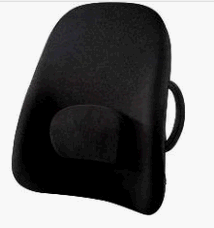 working as an Occupational Therapist. Of all the back-:rests I was exposed to, this was the only brand that everyone agreed was the best.
The Obus® Forme Back Rest was developed by Swedish orthopedic surgeons out of the University of Copenhagen (Denmark). Its unique curvature positions the lumbar, and thoracic spine while shifting the shoulders into proper alignment for action. They designers showed a significant decrease in intervetebral pressue, muscle strain, and comfort in users.
One of the best features of this product is the shifting of shoulder alignment. Without thought, the user is placed into a position which opens the thoracic cavity, improving shoulder range of motion and breathing pattern.
The Obus® Seat is designed to align the tail-bone and pelvis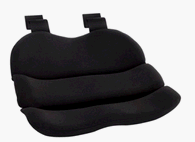 into a balanced and stable base for upper extremity activity. The even weight distribution it creates is key in it's claim to improving lower extremity circulation. It effectively positions the tailbone, sitting bones (ischial tuberosities), and thighs so that neutral posture is achieved and weight is effectively cushioned. The seat is securely attached to the Back Rest by two hook and loop fasteners.
All Obus® Forme products are portable and come in various sizes. They work in cars, on office chairs, and in easy chairs. The only problem I have found with them is that they require 2 to 2½ inches in increased depth in the chair. For some, this is not a problem. For others it may be.
I first came into contact with the Obus® Forme back support while I in Canada
working as an Occupational Therapist. Of all the back-:rests I was exposed to, this was the only brand that everyone agreed was the best. The Obus® Forme Back Rest was developed by Swedish orthopedic surgeons out of the University of Copenhagen (Denmark). Its unique curvature positions the lumbar, and thoracic spine while shifting the shoulders into proper alignment for action. They designers showed a significant decrease in intervetebral pressue, muscle strain, and comfort in users.
One of the best features of this product is the shifting of shoulder alignment. Without thought, the user is placed into a position which opens the thoracic cavity, improving shoulder range of motion and breathing pattern.
The Obus® Seat is designed to align the tail-bone and pelvis
into a balanced and stable base for upper extremity activity. The even weight distribution it creates is key in it's claim to improving lower extremity circulation. It effectively positions the tailbone, sitting bones (ischial tuberosities), and thighs so that neutral posture is achieved and weight is effectively cushioned. The seat is securely attached to the Back Rest by two hook and loop fasteners. All Obus® Forme products are portable and come in various sizes. They work in cars, on office chairs, and in easy chairs. The only problem I have found with them is that they require 2 to 2½ inches in increased depth in the chair. For some, this is not a problem. For others it may be.
- Lowback Backrest
- Comes with adjustable and removable lumbar support for extra modification.
- Also available with air bladder lumbar adjustment.
- Two sizes available – Regular and Wideback.
- Highback Backrest
- Supports upper back and neck as well.
- Available in two sizes.
- Removable adjustable lumbar support included.
- Ultra Premium Backrest
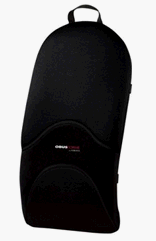
- Available in three sizes – Small fits height of 62 inches and under, Medium fits 62 inches to 74 inches*#44; Large fits 74 inches and taller.
- Provides firm and cushioned support for extended sitting.
- Ultra Seat
- Removable front panel for smaller seats.
- Gel Seat
- Firmer gel at the front and rear of the seat assist in maintaining an upright sitting posture.
- Softer gel in the center provides pressure relief for the 'sitting bones'.
- cushion has mesh cover for increased air circulation.
This site needs an editor - click to learn more!

Related Articles
Editor's Picks Articles
Top Ten Articles
Previous Features
Site Map
Content copyright © 2023 by virginia hixson. All rights reserved.
This content was written by virginia hixson. If you wish to use this content in any manner, you need written permission. Contact
BellaOnline Administration
for details.
